
Blog

Recent posts
SEARCH RESULTS FOR: Printing
There are lots of ways to make money as a landscape, travel, adventure, wildlife or fine art photographer. Shooting for a publication, for example, or selling through galleries or other commercial spaces such as tourist stops or cafes. Or working with clients to produce product or marketing images. Or décor for commercial or hospitality spaces. But over the course of your career you'll likely build a library of images that are yours to sell over and over again — if you could only work out how, without turning yourself into a shopkeeper! More opportunities today Today we're free to To View More >>
This entry was posted in Marketing by Alexandria Baugh

Modern cameras have sensors capable of producing big, beautiful images. They output files that can make large wall portraits without effort. But what happens when you want the image to be smaller, as in an album? What happens when you downsize a file that's big enough to print a large wall portrait, to create a 3x2" image on a page layout? When you export your images from Photojunction for printing, the software runs an automatic Photoshop process that resizes them and places them into a PSD file. The images are enlarged or reduced, and positioned to suit how you want them to appear on the To View More >>
This entry was posted in by Queensberry Website

In part this post is for the locals - us Kiwis and the Aussies from across the ditch. There's more below for those of you currently enjoying Summer… If you love Queensberry's album printing, why use another lab for everything else? We believe in consistency across the board. The same lovely people will do your colour correcting and printing. Depending on what you order, everything will be printed on the same machines. Turn around times are short and you will be talking to the same customer service team. We offer a range of traditional silver halide prints, canvas and fine art inkjet printing, To View More >>
This entry was posted in by Admin
We're working hard on systems to make designing, ordering and printing your albums easier. The latest thing we've done is commission PJ to add some features to Remix just for us. They’re in the latest final release - v1.2 - and they’re awesome: “Smart filtering” to avoid invalid selections when you order an album. A simpler version of LabFTP to use with Remix – no asking dumb questions when PJ already knows the answers. Dramatically better handling of Duo albums (here’s a movie , but really, it’s so simple you probably don’t need it). Remix now handles “cut-in” apertures! To View More >>
This entry was posted in by Admin
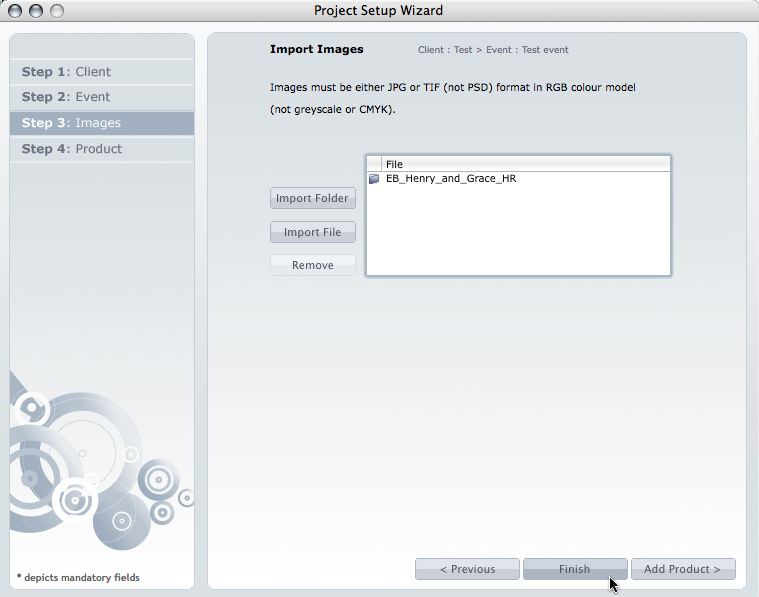
This post is now superseded by new functionality in Photojunction v1.22 and later). If you use Queensberry to design your albums we want to make the process as smooth as possible. Here’s how to go about it. (The PJ work sounds more complicated than it is, but we’re here to help if you need it. Follow the links for further information.) 1. Open up PJ Remix and click the Start New Project button. This fires up the Project Set-up Wizard for you to enter your Client and Event details and import the images. 2. Click Finish when you're done setting up the Project. Remix will import the images and To View More >>
This entry was posted in by Admin

Photojunction also harnesses the power of Photoshop for you during the export stage of the workflow, when you can open and edit exported page layouts in Photoshop from within Photojunction, just as you did the original image files. After you export your high-res page layouts (almost always using Photoshop) they become visible in the Export Layouts window. The layout files will have been saved to your hard disk, and so under your care and control, and many people want to work on them before printing. But you need to take care. If you rename or move the files, for example, Photojunction won’t be To View More >>
This entry was posted in by Admin
Hi all What an awesome privilege it's been to work with Queensberry to develop their Plug-in for Aperture 3! As a true blue Apple fanboy it's been a really exciting project to work on. When Apple came knocking we jumped at a chance to partner with them, but we've since had a few clients ask questions like: - What's the difference between Aperture 3 and Photojunction? - Why would you create a plug-in for Aperture when you already make Photojunction? ...And my personal favourite: - Does this mean Photojunction is dead!? We think your decision will ultimately be based on personal preference and To View More >>
This entry was posted in by Admin


