
Blog

Recent posts
SEARCH RESULTS FOR: Workflow
Client management is a big challenge in any small business — everything from keeping track of enquiries, client details and your calendar to managing projects, bookings, contracts, invoicing, image galleries and marketing tools. Rather than multiple systems that don't talk to each other, Workspace brings everything together in one connected platform. Here's a quick overview of how the Client Management workflow works inside Workspace. Step 1: Capture New Leads with Custom Forms Everything begins with a lead. When someone responds to a contact form, enquiry form, booking request or questionnaire To View More >>
This entry was posted in Uncategorized by Alexandria Baugh
If you’ve logged into Workspace recently you know we’ve launched Workspace 3.0 Not just another upgrade, it’s pretty massive! The key idea. instead of separate tools for different tasks, Workspace 3.0 brings everything together in one connected system. One subscription gives you everything from website and video delivery to client and task management, galleries, sales and product delivery. No disconnected tools. Try it right now with a Queensberry account You can login with your email . There's a reset password option if you’ve forgotten. You can continue To View More >>
This entry was posted in Product Updates by Alexandria Baugh
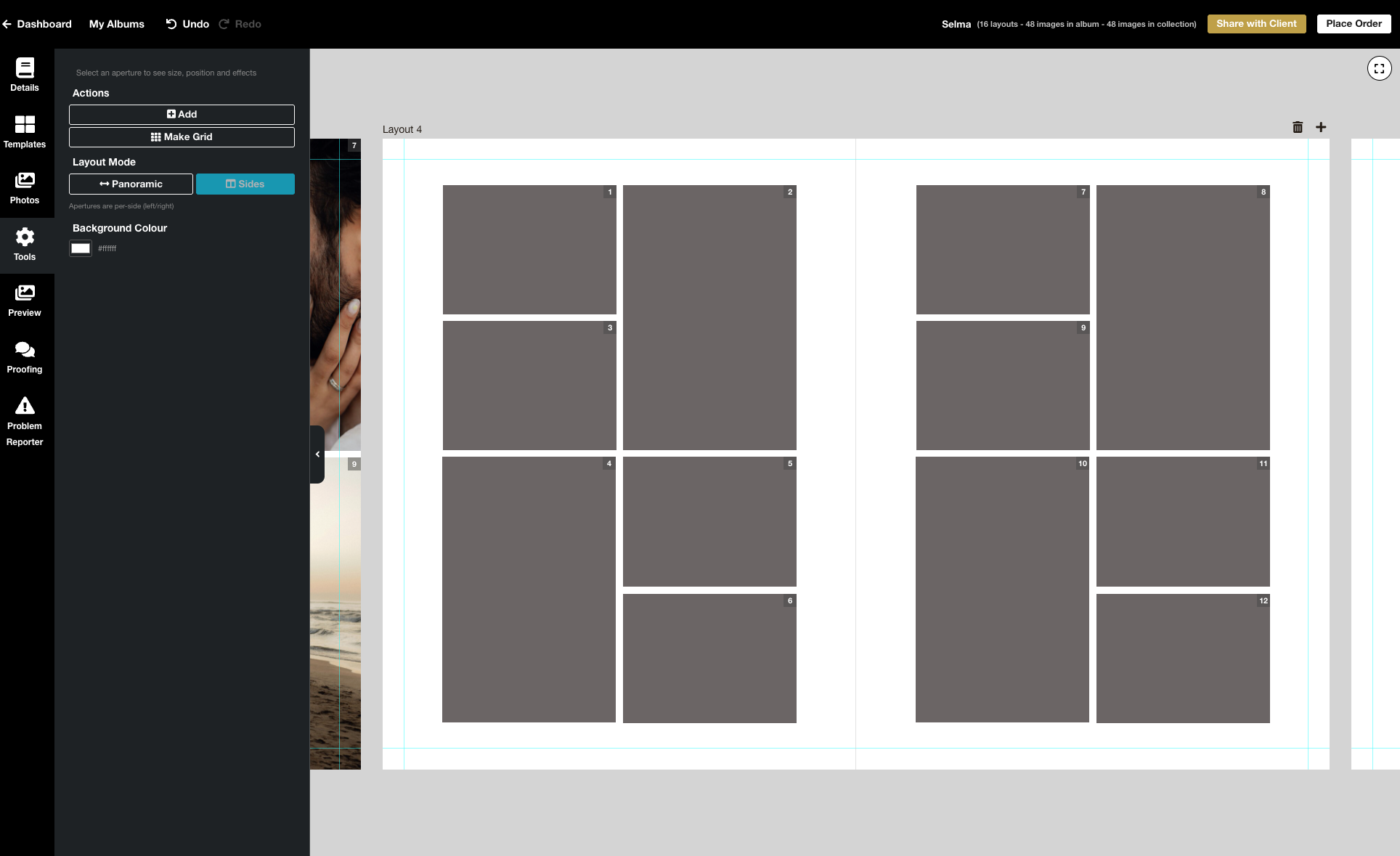
We’re excited to release the biggest update yet to our online Album Designer, focused on the things that matter most when you’re designing: control, speed, and precision. Here is a full list of what’s included in this release: Simple to use, faster and more fluid Our goal is to help you design beautiful albums easily, and you certainly can’t miss the improved performance! Even albums with many high-resolution images feel faster and more fluid: * Faster rendering * Fast movement between pages * Smoother drag-and-drop function * Reduced load times * Improved responsiveness To View More >>
This entry was posted in Product Updates by Stephen Baugh
We're delighted to announce that we're introducing Stripe as an alternative Workspace payment platform, alongside PayPal. Introducing Stripe means you can now activate a standard credit card form at checkout, and also get your payouts faster. However the two platforms interact with Workspace quite differently, and it's important to understand how… Stripe and PayPal are: — How you pay for your wholesale purchases from Queensberry. — How your clients pay for purchases in your retail shopping cart. — How Workspace pays you the profits To View More >>
This entry was posted in Product Updates by Ian Baugh
When's the right time for a promotion? Certainly for the holidays — so your clients can have their beautiful printed products under the tree for Christmas. The ultimate in personal gifts! Or when the wedding season's over — and you have time to chase past clients who're still dilly-dallying about their album. And for what purpose? Maybe to turn your social media audience into paying customers. Or lapsed enquiries into future business. Or past customers into repeat business! But once you've defined your goal, what's involved? This is our take on it, but of course To View More >>
This entry was posted in Marketing by Alexandria Baugh

Better emails for everyone! Most of us take great care over our “marketing”, like newsletters, special offers, advertising etc, but in a way what tells people the most about us are the little day to day interactions that we barely think about. Like our answerphone messages or our auto-reply email! Workspace sends out lots of automated emails — for example when you share galleries with your clients, when clients receive their digital downloads, or when they purchase products in your shopping cart. They’re a reflection of you — and us — and we want them to look To View More >>
This entry was posted in by Alexandria Baugh

Still working on getting albums approved six, nine, twelve months down the line? This will be eating into your time and your profit. Here are some simple ways to get albums approved quickly, while adding value for your client and offering them a great experience. 1. Get in quick! There's before the shoot and there's after the shoot. Before, they're looking at your products (yeah, nice!) and photos of … other people. Afterwards they have your photos of them to fall in love with — and they will. But get in quick! — before the emotion of the To View More >>
This entry was posted in by Victoria Hollings
Designing albums doesn't have to be difficult or take a lot of time. We show you how to simplify your album workflow and design your own albums with just a few of the features available in Workspace. So easy! Of course you can also use our design service (free with your album order) or third party apps like Fundy or SmartAlbums. Need extra help? You'll find plenty of articles about Workspace and Queensberry products and services on our main website and help centre, but click here for helpful video tutorials and articles about the Album To View More >>
This entry was posted in by Alexandria Baugh
With thousands of new templates to choose from in Queensberry's online album designer, here's a great way to simplify your workflow. Tag your favourites so you can filter out the rest. It's so easy, and this little video explains how. Need extra help? You'll find plenty of articles about Workspace and Queensberry products and services on our main website and help centre, but click here for helpful video tutorials and articles about the Album Designer. As we introduce changes we post details on the Queensberry blog, and To View More >>
This entry was posted in by Victoria Hollings
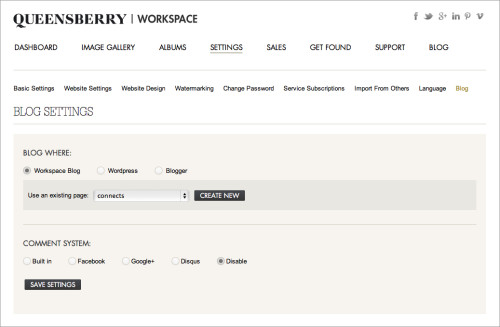
The new Workspace blogging feature allows you to set up a blog as part of your Workspace website OR send blog posts directly to your Blogger or Wordpress (self hosted) blog. This is a really useful feature as once you've uploaded and sorted images in Workspace, you can immediately post them as a slideshow or storyboard on your blog - making the Workspace workflow even smarter! It's a quick and easy way to get your images out in front of people online. Here's how it works (click on the images to view them larger): First you need to set up the blogging feature. You can do this under the SETTINGS To View More >>
This entry was posted in by Admin


