
Blog

Recent posts
SEARCH RESULTS FOR: Workflow
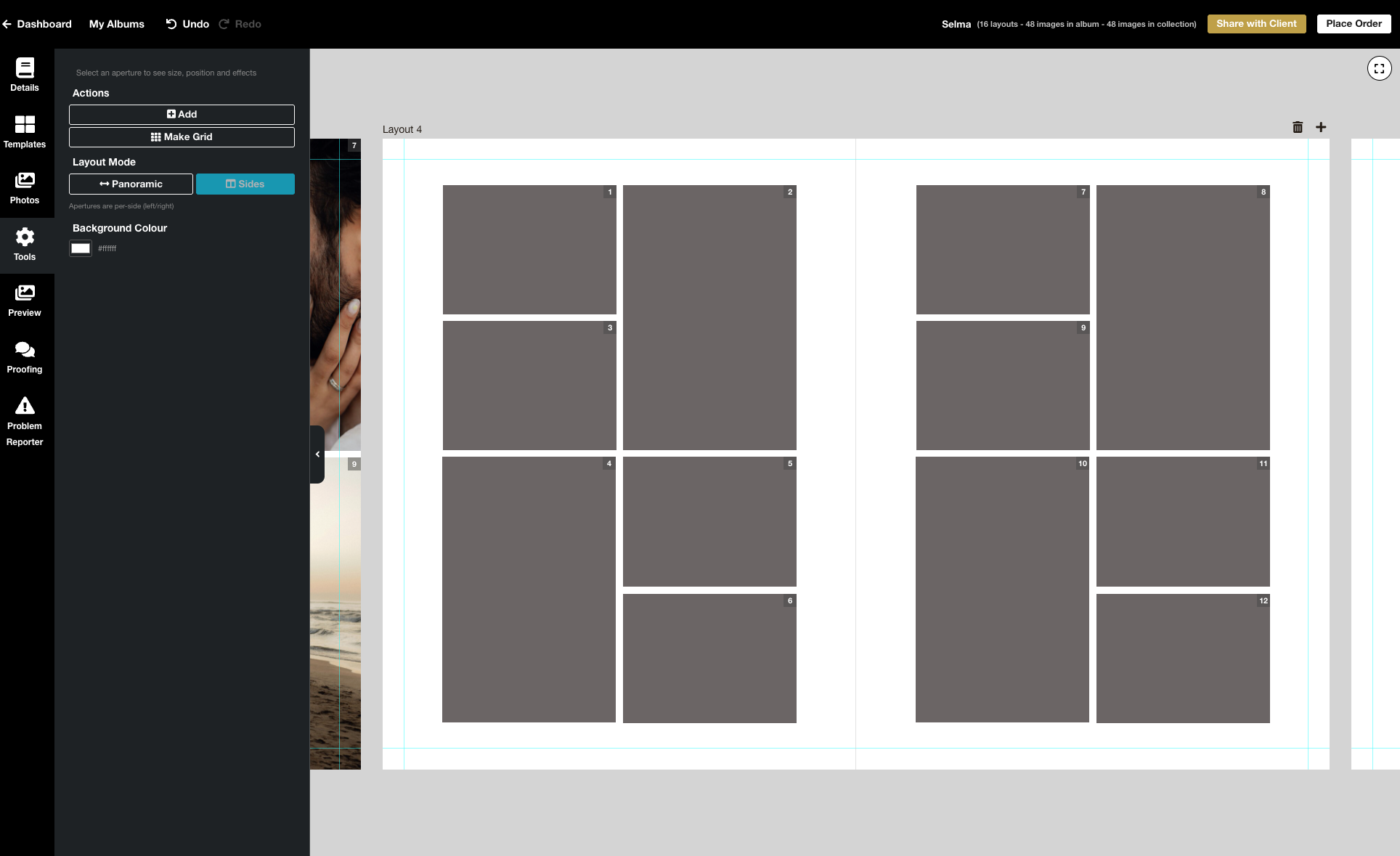
We’re excited to release the biggest update yet to our online Album Designer, focused on the things that matter most when you’re designing: control, speed, and precision. Here is a full list of what’s included in this release: Simple to use, faster and more fluid Our goal is to help you design beautiful albums easily, and you certainly can’t miss the improved performance! Even albums with many high-resolution images feel faster and more fluid: * Faster rendering * Fast movement between pages * Smoother drag-and-drop function * Reduced load times * Improved responsiveness To View More >>
This entry was posted in Product Updates by Stephen Baugh
When's the right time for a promotion? Certainly for the holidays — so your clients can have their beautiful printed products under the tree for Christmas. The ultimate in personal gifts! Or when the wedding season's over — and you have time to chase past clients who're still dilly-dallying about their album. And for what purpose? Maybe to turn your social media audience into paying customers. Or lapsed enquiries into future business. Or past customers into repeat business! But once you've defined your goal, what's involved? This is our take on it, but of course To View More >>
This entry was posted in Marketing by Alexandria Baugh

Better emails for everyone! Most of us take great care over our “marketing”, like newsletters, special offers, advertising etc, but in a way what tells people the most about us are the little day to day interactions that we barely think about. Like our answerphone messages or our auto-reply email! Workspace sends out lots of automated emails — for example when you share galleries with your clients, when clients receive their digital downloads, or when they purchase products in your shopping cart. They’re a reflection of you — and us — and we want them to look To View More >>
This entry was posted in by Alexandria Baugh

Still working on getting albums approved six, nine, twelve months down the line? This will be eating into your time and your profit. Here are some simple ways to get albums approved quickly, while adding value for your client and offering them a great experience. 1. Get in quick! There's before the shoot and there's after the shoot. Before, they're looking at your products (yeah, nice!) and photos of … other people. Afterwards they have your photos of them to fall in love with — and they will. But get in quick! — before the emotion of the To View More >>
This entry was posted in by Victoria Hollings
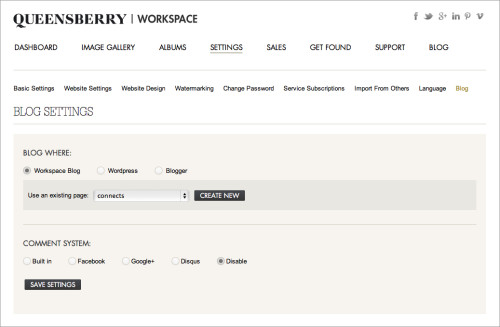
The new Workspace blogging feature allows you to set up a blog as part of your Workspace website OR send blog posts directly to your Blogger or Wordpress (self hosted) blog. This is a really useful feature as once you've uploaded and sorted images in Workspace, you can immediately post them as a slideshow or storyboard on your blog - making the Workspace workflow even smarter! It's a quick and easy way to get your images out in front of people online. Here's how it works (click on the images to view them larger): First you need to set up the blogging feature. You can do this under the SETTINGS To View More >>
This entry was posted in by Admin

Improved image uploading is probably the biggest deal in this release of Queensberry Workspace, but have a play and judge for yourself. It’s free to try! Uploading Workspace now has six image uploaders for you to choose from – two web-based and four desktop uploaders. Pick one to suit your workflow. The upload window shows them all, including the links and instructions you'll need to use them. You can upload to existing events and collections or create new ones on the fly. One of the web uploaders is slower than the other, but more robust if your internet connection isn't the best. You can To View More >>
This entry was posted in by Admin
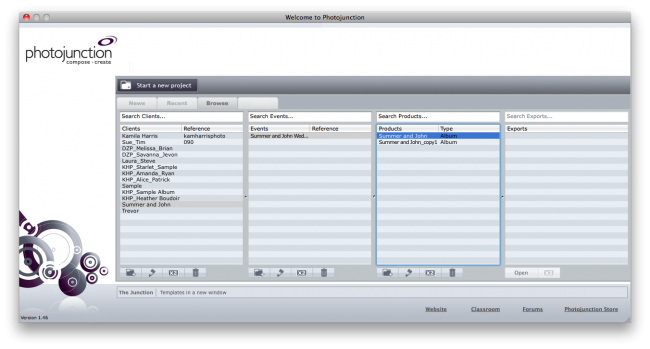
As promised in our recent post about the Photojunction Welcome screen, I wanted to take some extra time to go over the Browse tab with some suggestions to maybe make your workflow smoother. The first column is your Client column. This seems fairly self-explanatory right? In column 2 your clients could have multiple Events. For example, an engagement shoot, wedding, day-after session, maternity shoot, newborn shoot, and then family shoot. Wouldn't it be wonderful if every client were booking that many shoots? Each event can then have multiple Products (column 3). For a wedding, you might create To View More >>
This entry was posted in by Admin

Photojunction also harnesses the power of Photoshop for you during the export stage of the workflow, when you can open and edit exported page layouts in Photoshop from within Photojunction, just as you did the original image files. After you export your high-res page layouts (almost always using Photoshop) they become visible in the Export Layouts window. The layout files will have been saved to your hard disk, and so under your care and control, and many people want to work on them before printing. But you need to take care. If you rename or move the files, for example, Photojunction won’t be To View More >>
This entry was posted in by Admin
Hi all What an awesome privilege it's been to work with Queensberry to develop their Plug-in for Aperture 3! As a true blue Apple fanboy it's been a really exciting project to work on. When Apple came knocking we jumped at a chance to partner with them, but we've since had a few clients ask questions like: - What's the difference between Aperture 3 and Photojunction? - Why would you create a plug-in for Aperture when you already make Photojunction? ...And my personal favourite: - Does this mean Photojunction is dead!? We think your decision will ultimately be based on personal preference and To View More >>
This entry was posted in by Admin


