
Blog

Recent posts
CATEGORY: Product Updates
If you’ve logged into Workspace recently you know we’ve launched Workspace 3.0 Not just another upgrade, it’s pretty massive! The key idea. instead of separate tools for different tasks, Workspace 3.0 brings everything together in one connected system. One subscription gives you everything from website and video delivery to client and task management, galleries, sales and product delivery. No disconnected tools. Try it right now with a Queensberry account You can login with your email . There's a reset password option if you’ve forgotten. You can continue To View More >>
This entry was posted in Product Updates by Alexandria Baugh
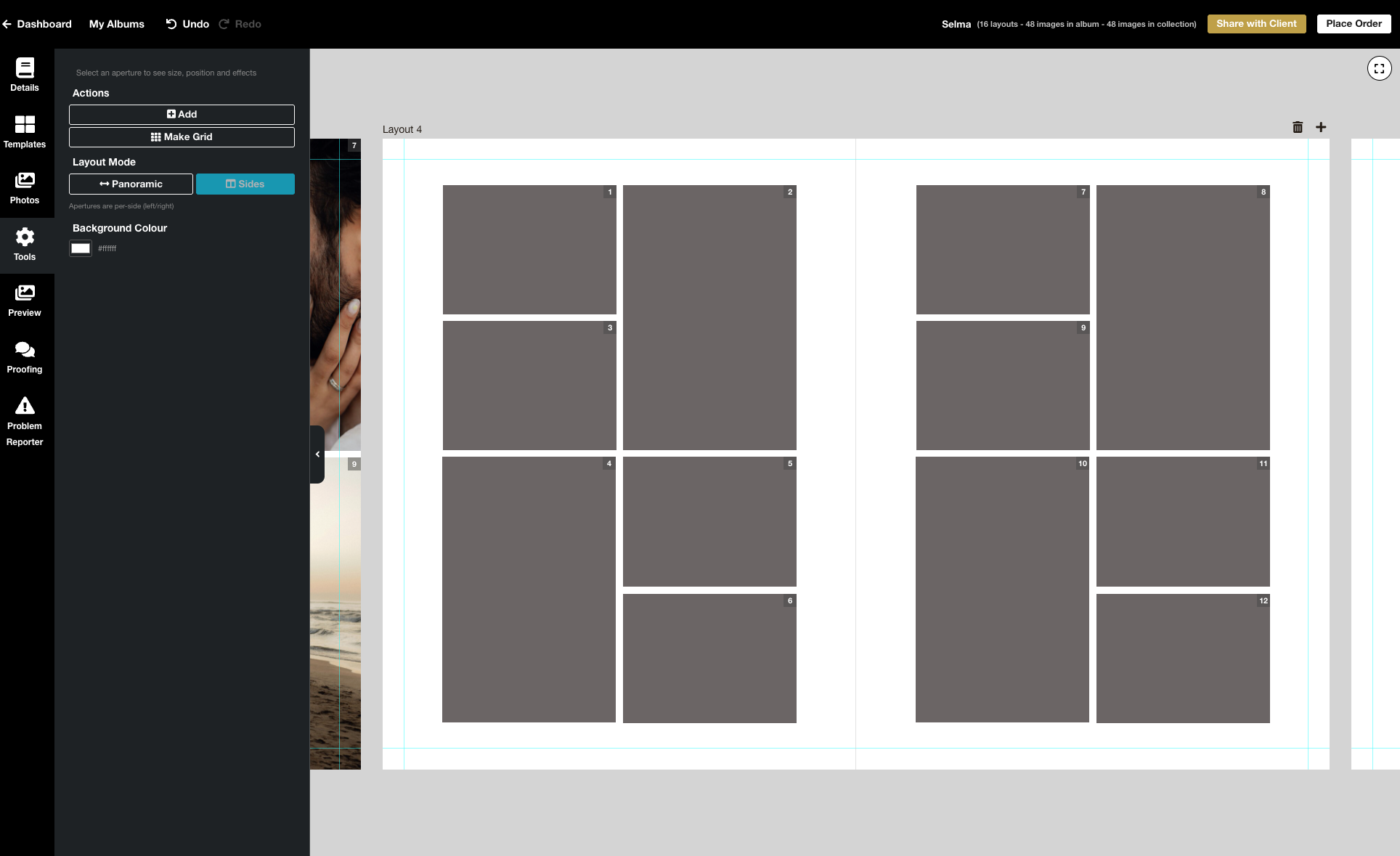
We’re excited to release the biggest update yet to our online Album Designer, focused on the things that matter most when you’re designing: control, speed, and precision. Here is a full list of what’s included in this release: Simple to use, faster and more fluid Our goal is to help you design beautiful albums easily, and you certainly can’t miss the improved performance! Even albums with many high-resolution images feel faster and more fluid: * Faster rendering * Fast movement between pages * Smoother drag-and-drop function * Reduced load times * Improved responsiveness To View More >>
This entry was posted in Product Updates by Stephen Baugh

We've made changes to the Workspace Client Gallery setting "Viewers must register" after some great feedback in our Facebook group, The Insider. Until now if you turned on the "Viewers must register" gallery setting, visitors had to create an "account" before they could view a gallery. The setting was optional, and its purpose was to track who was viewing your galleries and to collect their email addresses. This change will make it easier for people to get access while still allowing you to collect those addresses. Here's what we have done We've replaced the original setting with "Require Email To View More >>
This entry was posted in Product Updates by Alexandria Baugh
We're delighted to announce that we're introducing Stripe as an alternative Workspace payment platform, alongside PayPal. Introducing Stripe means you can now activate a standard credit card form at checkout, and also get your payouts faster. However the two platforms interact with Workspace quite differently, and it's important to understand how… Stripe and PayPal are: — How you pay for your wholesale purchases from Queensberry. — How your clients pay for purchases in your retail shopping cart. — How Workspace pays you the profits To View More >>
This entry was posted in Product Updates by Ian Baugh

A few weeks ago we gave you a sneak peek at a major upgrade to our Client Galleries, designed to make it easier than ever for wedding and portrait photographers to sell print products to their clients. It' s based on what we've learned from the success of Print Shop, our other online sales platform. We're delighted to announce that it's now live, and accessible on all paid Workspace plans. Here we'll step you through the main features, but first, we're often asked — why do we offer two platforms? Because the customers are totally different, and so To View More >>
This entry was posted in Product Updates by Ian Baugh
We've been thinking a lot recently about how we can make the switch to Queensberry even easier. That's why we're offering client gallery migration and set-up services to help you get up and running fast in 2021. Until January 31st we'll move your galleries for you and help you set up in Workspace. We'll move your galleries from another platform for just US$1/gallery if you have a yearly subscription, or US$2/gallery if you're paying monthly. And if you can't face the hassle of making the move, never fear! Our optional set-up services will smooth the way and get you up and running fast — To View More >>
This entry was posted in Product Updates by Alexandria Baugh

Something changed for the better a few months ago, when we launched Print Shop, our platform for photographers and artists who are selling their work online as decor or works of art. Print Shop users have been very successful selling more expensive, more profitable, products — frames rather than loose prints, for example, larger frames rather than smaller ones. The work is beautiful, of course, and it is being sold as wall art, but we do think the Print Shop "store front" and product previews have helped with this success. That's why we're making the To View More >>
This entry was posted in Product Updates by Alexandria Baugh

We’re very excited to announce that our online Client Galleries in Workspace have had a face lift, and boy do they look good! We’ve released four new gallery styles, including a video option. Each can be further personalised to suit your taste and style by very easily changing fonts and other elements. Please do check them out and let us know what you think. Client Gallery Option 1: Simplicity Simplicity is an upgrade of our current "Standard" gallery style. We've worked to refine the font selections and sizes to give this gallery a more modern feel. To View More >>
This entry was posted in Product Updates by Alexandria Baugh

Typography plays an important role in the overall look of websites, so it's no surprise that one of the common things people want to do in Workspace is change fonts. Workspace offers a range that you can select from in the text widgets (as in the graphic) but what if you want something completely different? This tutorial will explain what to do. Warning! This will get a bit geeky, so if you're not comfortable coding CSS and HTML, contact us and for a small charge we can arrange to do the work for you. Otherwise get someone else with the necessary experience, as we To View More >>
This entry was posted in Product Updates by Alexandria Baugh
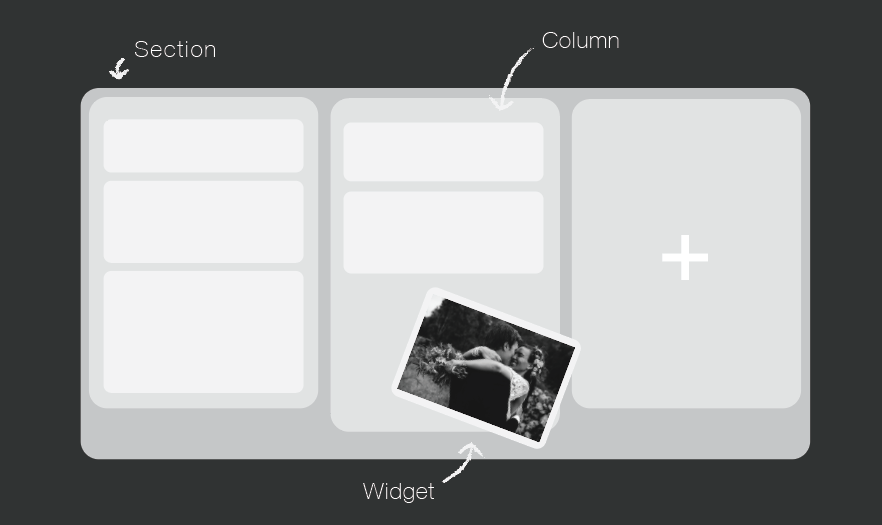
Your website is a tool to get your name out there, increase bookings, keep your clients updated, and share your work. You can do all that very easily in Workspace. Over the next few weeks, we will be focussing on creating a Workspace website you can be proud of, which is completely unique to you and your business. The Page Designer Each page is built up of horizontal sections, which you can divide up into columns. Within those columns, you add "widgets" to build components like hero images, text, contact forms and slide shows into your site. Workspace has a wide range of To View More >>
This entry was posted in Product Updates by Alexandria Baugh


