
Blog

Recent posts
SEARCH RESULTS FOR: Tutorial

You've sent your album design to your client for proofing, now what? Using a proofing system could be a little daunting if you've never done it before, so we've created a tutorial specifically for your clients to follow so that you can get their feedback and order the album. We've even made it so when your client opens up their album design, the tutorial will appear in front of them so there's no need to do anything. Do you have any feedback? We regularly update album proofing to make it work better for you. Contact us if you have any comments or suggestions. Victoria To View More >>
This entry was posted in by Victoria Hollings

Typography plays an important role in the overall look of websites, so it's no surprise that one of the common things people want to do in Workspace is change fonts. Workspace offers a range that you can select from in the text widgets (as in the graphic) but what if you want something completely different? This tutorial will explain what to do. Warning! This will get a bit geeky, so if you're not comfortable coding CSS and HTML, contact us and for a small charge we can arrange to do the work for you. Otherwise get someone else with the necessary experience, as we To View More >>
This entry was posted in Product Updates by Alexandria Baugh
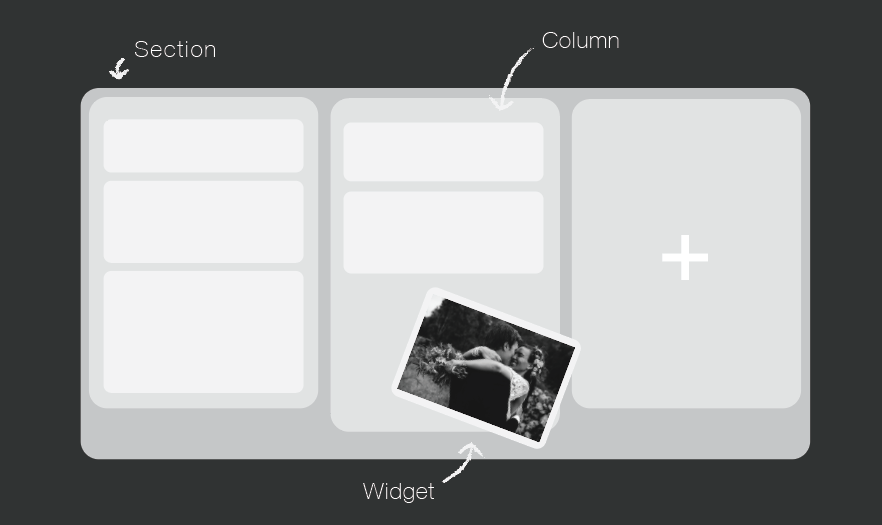
Your website is a tool to get your name out there, increase bookings, keep your clients updated, and share your work. You can do all that very easily in Workspace. Over the next few weeks, we will be focussing on creating a Workspace website you can be proud of, which is completely unique to you and your business. The Page Designer Each page is built up of horizontal sections, which you can divide up into columns. Within those columns, you add "widgets" to build components like hero images, text, contact forms and slide shows into your site. Workspace has a wide range of To View More >>
This entry was posted in Product Updates by Alexandria Baugh

Some Workspace users have more than one account (separate brands for their wedding and portrait businesses, for example). Some busy studios have several people working in the same Workspace account (photographers, designers, sales people, for example). And some users do work for the owners of multiple Workspace accounts (album designers, editors, site managers, for example). In all those scenarios the Workspace Accounts and Users function makes life very easy. Save 40% on your annual Workspace subscription. Just quote WS40 when subscribing or updating. To View More >>
This entry was posted in by Victoria Hollings

Workspace keeps your images as safe as possible by never displaying the high-res image, and by disabling the browser’s right-click download function. You can also add watermarks to your images. Simply upload your watermark to Workspace, and apply it to a collection of images. Workspace does the work for you, applying the watermark you've selected to each image – so you don't have to do each one by hand! You also have different watermark placement options, from which you can select the most appropriate option for you. Watch our tutorial below on how to use our watermarking feature: To View More >>
This entry was posted in by Victoria Hollings

Your blog is a great way to share your work and connect with potential new clients. It's a tool for drawing people in from Facebook and other social media sites, for keeping your site fresh, interesting and ever-changing, and for keeping your image galleries and work in front of people. Share your ideas and interests too! It’s a great way make your website feel more personal. If people can get an idea of the type of person you are, they are more likely to feel comfortable and trust you. What you talk about on your blog is important. One advantage you have over other bloggers To View More >>
This entry was posted in by Victoria Hollings
We're working hard on systems to make designing, ordering and printing your albums easier. The latest thing we've done is commission PJ to add some features to Remix just for us. They’re in the latest final release - v1.2 - and they’re awesome: “Smart filtering” to avoid invalid selections when you order an album. A simpler version of LabFTP to use with Remix – no asking dumb questions when PJ already knows the answers. Dramatically better handling of Duo albums (here’s a movie , but really, it’s so simple you probably don’t need it). Remix now handles “cut-in” apertures! To View More >>
This entry was posted in by Admin


