
Blog

Recent posts
SEARCH RESULTS FOR: Photojunction

Modern cameras have sensors capable of producing big, beautiful images. They output files that can make large wall portraits without effort. But what happens when you want the image to be smaller, as in an album? What happens when you downsize a file that's big enough to print a large wall portrait, to create a 3x2" image on a page layout? When you export your images from Photojunction for printing, the software runs an automatic Photoshop process that resizes them and places them into a PSD file. The images are enlarged or reduced, and positioned to suit how you want them to appear on the To View More >>
This entry was posted in by Queensberry Website

Ok it's not the same as getting a new iPhone for Christmas but for the inner Photojunction tech support geek it gets pretty close. Same with all you power users out there I reckon. For me the big one is the first... A new shortcut for choosing standard aperture sizes Instead of selecting an aperture size from the pop-up menu you can now use keyboard shortcuts to increase or decrease an aperture to the next standard size. • For Mac OSX Command+Shift+I and Command+Shift+K • For Windows Control+Shift+I and Control+Shift+K. Next we have not one, not two but three new right-click functions [caption To View More >>
This entry was posted in by Admin
We are about to release a new version of Photojunction that will no longer support Macintosh pre-Intel PowerPCs, which were discontinued in 2006. This is necessary so that we can upgrade the Photojunction development environment, which no longer supports PowerPCs. If you are running a Windows PC you won't be affected. If you're running an Intel-based Mac you won't be affected either. All Macs have been Intel-based since 2007, so if your computer is newer than that you're fine. If you're not sure you can check by going to About This Mac under the Apple menu. We have announced that this is coming To View More >>
This entry was posted in by Admin
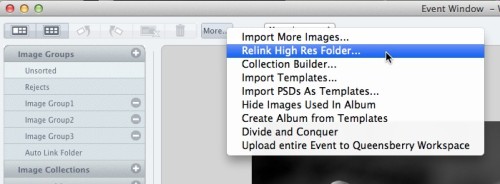
Warning: Your high-res files are missing! At one stage or another in your relationship with Photojunction I'm sure you've encountered this warning. If it was a popularity contest it would end up below car salesmen, cold callers and politicians. But love it (nobody) or hate it (everybody) it's there for a good reason. Photojunction travels along paths. It follows those paths to locate, use and update the proxy images, hi res files and exports created as you work. The rules are simple. If you don't move, rename or delete your files and folders, Photojunction will find them. But life isn't simple, To View More >>
This entry was posted in by Admin

I was talking to Simon, one of our album layout designers, about how the team were finding the new Workspace album proofing feature. They've been using it with photographers for a few months now and I was keen to get his feedback. What follows is pretty much his response verbatim. "It's working brilliantly! We get to review the studio’s comments alongside the relevant layouts. It’s accurate and clear to follow. "Not having to interpret requests for edits in emails is a real bonus. The integrated communication between the studio, bride and groom, and designer keeps everybody in the loop, and To View More >>
This entry was posted in by Admin

In part this post is for the locals - us Kiwis and the Aussies from across the ditch. There's more below for those of you currently enjoying Summer… If you love Queensberry's album printing, why use another lab for everything else? We believe in consistency across the board. The same lovely people will do your colour correcting and printing. Depending on what you order, everything will be printed on the same machines. Turn around times are short and you will be talking to the same customer service team. We offer a range of traditional silver halide prints, canvas and fine art inkjet printing, To View More >>
This entry was posted in by Admin

Improved image uploading is probably the biggest deal in this release of Queensberry Workspace, but have a play and judge for yourself. It’s free to try! Uploading Workspace now has six image uploaders for you to choose from – two web-based and four desktop uploaders. Pick one to suit your workflow. The upload window shows them all, including the links and instructions you'll need to use them. You can upload to existing events and collections or create new ones on the fly. One of the web uploaders is slower than the other, but more robust if your internet connection isn't the best. You can To View More >>
This entry was posted in by Admin
If you reopen an album in Photojunction after sending to Queensberry, you'll notice it's "locked" and cannot be modified. Why? Because if you were to make changes to the album after we've received the order, we'd be making something different, which would certainly cause us confusion – you, us, or all of us – as you can imagine. So if you need to make changes to the album, eg upload new files, or order an extra copy, you'll need to duplicate the album first. Cheers, Angelique To View More >>
This entry was posted in by Admin
We're working hard on systems to make designing, ordering and printing your albums easier. The latest thing we've done is commission PJ to add some features to Remix just for us. They’re in the latest final release - v1.2 - and they’re awesome: “Smart filtering” to avoid invalid selections when you order an album. A simpler version of LabFTP to use with Remix – no asking dumb questions when PJ already knows the answers. Dramatically better handling of Duo albums (here’s a movie , but really, it’s so simple you probably don’t need it). Remix now handles “cut-in” apertures! To View More >>
This entry was posted in by Admin
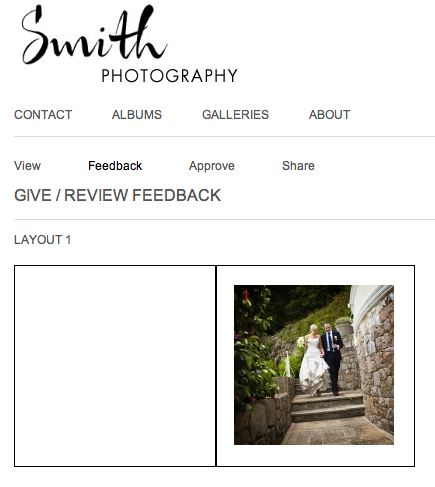
One of the most useful features of Workspace is album proofing. You can proof books and albums you've designed in Photojunction, and also Queensberry books and albums you've designed in Workspace. In the FREE account you can proof Queensberry books and albums, but to proof a non-Queensberry album, you need a Workspace "Basic" subscription, which will cost you $10 per month. The main advantage to Workspace proofing over Albumexposure is that your albums will be proofed on a site that highlights YOUR brand, not Queensberry or AlbumExposure! You can also integrate your Workspace site with your existing To View More >>
This entry was posted in by Admin


