
Blog

Recent posts
SEARCH RESULTS FOR: Cut-in
The update includes new website widgets, product preview scenes, volume pricing for eligible prints and cookie-consent controls for Workspace websites. Our new Print Shop Gallery and Print Feature widgets give you more control over how your work is presented across your Workspace website. Use Print Shop Gallery to customise the look of your shop landing page with classic or card-style layouts, different image proportions and clean, coloured or framed presentations. Use Print Feature to draw attention to a smaller selection of work elsewhere on your website. Together, they help you create a more To View More >>
This entry was posted in Updates by Alexandria Baugh
We've been thinking a lot recently about how we can make the switch to Queensberry even easier. That's why we're offering client gallery migration and set-up services to help you get up and running fast in 2021. Until January 31st we'll move your galleries for you and help you set up in Workspace. We'll move your galleries from another platform for just US$1/gallery if you have a yearly subscription, or US$2/gallery if you're paying monthly. And if you can't face the hassle of making the move, never fear! Our optional set-up services will smooth the way and get you up and running fast — To View More >>
This entry was posted in Product Updates by Alexandria Baugh

We’re very excited to announce that our online Client Galleries in Workspace have had a face lift, and boy do they look good! We’ve released four new gallery styles, including a video option. Each can be further personalised to suit your taste and style by very easily changing fonts and other elements. Please do check them out and let us know what you think. Client Gallery Option 1: Simplicity Simplicity is an upgrade of our current "Standard" gallery style. We've worked to refine the font selections and sizes to give this gallery a more modern feel. To View More >>
This entry was posted in Product Updates by Alexandria Baugh

If you heven't logged into Workspace for a while you may be surprised next time by a very different looking platform. That’s because our December upgrade has now been rolled out. Here's what we've done. Interface upgrade (updated, simpler, more intuitive) Although much of what we've done in this upgrade is "behind the scenes", we’ve also worked hard on the user interface. We've gone for a cleaner, more contemporary look, refined things to keep pace with evolving web design standards, and repositioned and relabelled buttons and other calls To View More >>
This entry was posted in by Alexandria Baugh

The Queensberry online album designer is a great on the go resource that makes designing albums quick and easy. You can share your design with your clients for proofing, or share a slideshow of the finished design by email or on social media. Here's how to upload a song to Workspace, attach it to your album slideshows, and share them just like you share your image galleries. 1. Upload your chosen song In Workspace’s main navigation click “Settings” then "Appearance". Go to the Music tab to upload your music track. Please ensure you have the rights to use it before To View More >>
This entry was posted in by Alexandria Baugh
Our new Online Album Designer is a great on the go resource that makes designing and editing books and albums quick and easy. Today we show you how you to swap images around in the design. To switch images on the same layout: Drag and drop one image over the other. They will change places. To switch an image with another on a different layout: Click one of the images you want to switch and drag it to the side of the screen, which will allow you to scroll through the layouts. When you get to the layout you want, drag the image you're moving over the image To View More >>
This entry was posted in by Alexandria Baugh

Today we roll out updates to the button widget in Workspace, allowing you to easily customise any button you wish to add to your site. Simply add the button widget to any page on Workspace, and turn on custom design. You will able to customise the background colour, the border colour, font size, font colour, the button width and radius (curving the corners of the button). For more on Workspace's, no code necessary web page builder, click here. Alexandria x Featured canvas by Siem Pre Photography To View More >>
This entry was posted in by Alexandria Baugh
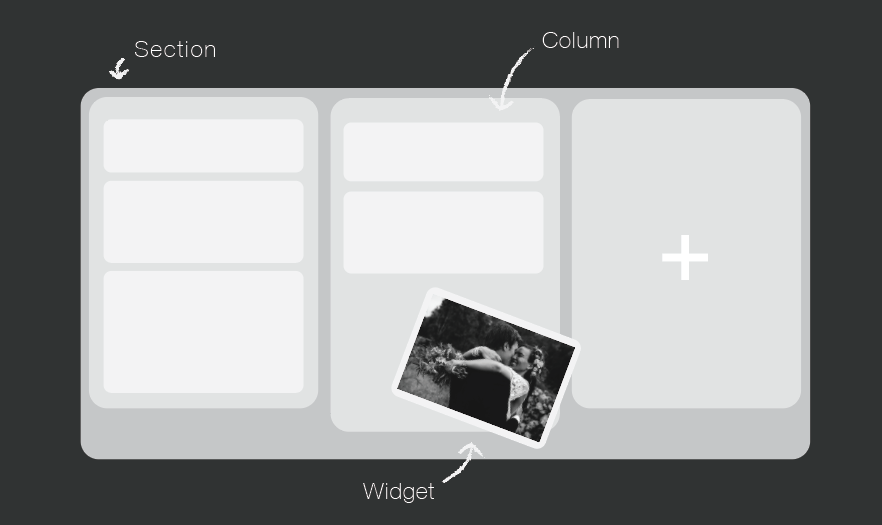
Your website is a tool to get your name out there, increase bookings, keep your clients updated, and share your work. You can do all that very easily in Workspace. Over the next few weeks, we will be focussing on creating a Workspace website you can be proud of, which is completely unique to you and your business. The Page Designer Each page is built up of horizontal sections, which you can divide up into columns. Within those columns, you add "widgets" to build components like hero images, text, contact forms and slide shows into your site. Workspace has a wide range of To View More >>
This entry was posted in Product Updates by Alexandria Baugh

Here we go! As we hinted last week we’re introducing... ZERO COMMISSION ON ALL PAID WORKSPACE PLANS, effective immediately * If you’re a professional photographer, Workspace offers the most affordable and powerful image hosting service out there, and you can use almost every Workspace feature on our cheapest paid plan - just upgrade as you need more storage. COMPARE WORKSPACE PLANS But that’s not all Portrait and wedding photographers need more than image galleries and shopping carts. They need album design software, online album proofing, mobile image apps, and personal client To View More >>
This entry was posted in by Melissa Dangerfield

Here's what people like most about Workspace: When they make a sale there's nothing to do. No need to liaise with the buyer, collect the money, order the product or deliver it. All you have to do is read our notification email. :) People quite like the 10th of the month too, when they get another email to say the money has hit their Paypal account. But occasionally money gets returned to us because someone hasn't "accepted" the payment. If you don't claim your money you'll get an email from Paypal like the one in the graphic below. Normally all you have to do is click the "Claim Your Money Now" To View More >>
This entry was posted in by Admin


