
Blog

Recent posts
SEARCH RESULTS FOR: Cut-in
The update includes new website widgets, product preview scenes, volume pricing for eligible prints and cookie-consent controls for Workspace websites. Our new Print Shop Gallery and Print Feature widgets give you more control over how your work is presented across your Workspace website. Use Print Shop Gallery to customise the look of your shop landing page with classic or card-style layouts, different image proportions and clean, coloured or framed presentations. Use Print Feature to draw attention to a smaller selection of work elsewhere on your website. Together, they help you create a more To View More >>
This entry was posted in Updates by Alexandria Baugh
We very rarely share the positive reviews we receive from our clients but the other day we received a pretty special one from one of our new Print Shop users, Damien Lovegrove. He's a "go for it" guy who'd launched his store within a week of deciding to use Print Shop, and within days of that made his first large format canvas sale. We're sharing his review for two reasons: It offers great advice for anyone starting out — why he chose the platform, and the challenges he faced when setting it up. If you're already using Print Shop we'd love your thoughts over on the insider about what features To View More >>
This entry was posted in Stories by Alexandria Baugh

We've made changes to the Workspace Client Gallery setting "Viewers must register" after some great feedback in our Facebook group, The Insider. Until now if you turned on the "Viewers must register" gallery setting, visitors had to create an "account" before they could view a gallery. The setting was optional, and its purpose was to track who was viewing your galleries and to collect their email addresses. This change will make it easier for people to get access while still allowing you to collect those addresses. Here's what we have done We've replaced the original setting with "Require Email To View More >>
This entry was posted in Product Updates by Alexandria Baugh

Something changed for the better a few months ago, when we launched Print Shop, our platform for photographers and artists who are selling their work online as decor or works of art. Print Shop users have been very successful selling more expensive, more profitable, products — frames rather than loose prints, for example, larger frames rather than smaller ones. The work is beautiful, of course, and it is being sold as wall art, but we do think the Print Shop "store front" and product previews have helped with this success. That's why we're making the To View More >>
This entry was posted in Product Updates by Alexandria Baugh

So your Print Shop is live, you’re all set and ready to go, and now you’re wondering how to get your first paying customers. Your first sales are some of the most important. They build momentum and motivation, and will help you refine your marketing strategy going forward. But it’s no surprise that they can be some of the hardest to get. Here are eight suggestions to get your first paying customers. Share the news with family, friends and your personal networks Your friends, family and personal networks are a great place to start. Not only will they want to support To View More >>
This entry was posted in Marketing by Alexandria Baugh

We’re very excited to announce that our online Client Galleries in Workspace have had a face lift, and boy do they look good! We’ve released four new gallery styles, including a video option. Each can be further personalised to suit your taste and style by very easily changing fonts and other elements. Please do check them out and let us know what you think. Client Gallery Option 1: Simplicity Simplicity is an upgrade of our current "Standard" gallery style. We've worked to refine the font selections and sizes to give this gallery a more modern feel. To View More >>
This entry was posted in Product Updates by Alexandria Baugh

If you heven't logged into Workspace for a while you may be surprised next time by a very different looking platform. That’s because our December upgrade has now been rolled out. Here's what we've done. Interface upgrade (updated, simpler, more intuitive) Although much of what we've done in this upgrade is "behind the scenes", we’ve also worked hard on the user interface. We've gone for a cleaner, more contemporary look, refined things to keep pace with evolving web design standards, and repositioned and relabelled buttons and other calls To View More >>
This entry was posted in by Alexandria Baugh

The Queensberry online album designer is a great on the go resource that makes designing albums quick and easy. You can share your design with your clients for proofing, or share a slideshow of the finished design by email or on social media. Here's how to upload a song to Workspace, attach it to your album slideshows, and share them just like you share your image galleries. 1. Upload your chosen song In Workspace’s main navigation click “Settings” then "Appearance". Go to the Music tab to upload your music track. Please ensure you have the rights to use it before To View More >>
This entry was posted in by Alexandria Baugh
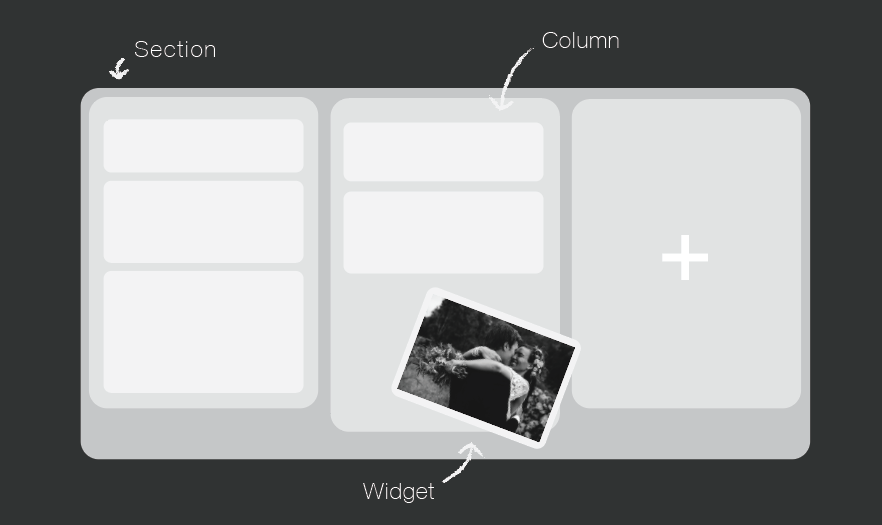
Your website is a tool to get your name out there, increase bookings, keep your clients updated, and share your work. You can do all that very easily in Workspace. Over the next few weeks, we will be focussing on creating a Workspace website you can be proud of, which is completely unique to you and your business. The Page Designer Each page is built up of horizontal sections, which you can divide up into columns. Within those columns, you add "widgets" to build components like hero images, text, contact forms and slide shows into your site. Workspace has a wide range of To View More >>
This entry was posted in Product Updates by Alexandria Baugh

We’ve just released the Queensberry Help Centre, a new resource where photographers can get answers 24/7 about things Queensberry and Workspace — everything from detailed product information to helpful video tutorials. Click here to check it out, or go to your Workspace Dashboard and click on Support. The Help Centre is a work in progress, and we’d love your feedback and suggestions for additional content. Over the next few weeks we’ll be reviewing all content for relevance, clarity and accuracy. For now the “other software” category remains in the To View More >>
This entry was posted in by Queensberry Website


