
Blog

Recent posts
SEARCH RESULTS FOR: Cut-in
The update includes new website widgets, product preview scenes, volume pricing for eligible prints and cookie-consent controls for Workspace websites. Our new Print Shop Gallery and Print Feature widgets give you more control over how your work is presented across your Workspace website. Use Print Shop Gallery to customise the look of your shop landing page with classic or card-style layouts, different image proportions and clean, coloured or framed presentations. Use Print Feature to draw attention to a smaller selection of work elsewhere on your website. Together, they help you create a more To View More >>
This entry was posted in Updates by Alexandria Baugh
If you’ve logged into Workspace recently you know we’ve launched Workspace 3.0 Not just another upgrade, it’s pretty massive! The key idea. instead of separate tools for different tasks, Workspace 3.0 brings everything together in one connected system. One subscription gives you everything from website and video delivery to client and task management, galleries, sales and product delivery. No disconnected tools. Try it right now with a Queensberry account You can login with your email . There's a reset password option if you’ve forgotten. You can continue To View More >>
This entry was posted in Product Updates by Alexandria Baugh
We've been thinking a lot recently about how we can make the switch to Queensberry even easier. That's why we're offering client gallery migration and set-up services to help you get up and running fast in 2021. Until January 31st we'll move your galleries for you and help you set up in Workspace. We'll move your galleries from another platform for just US$1/gallery if you have a yearly subscription, or US$2/gallery if you're paying monthly. And if you can't face the hassle of making the move, never fear! Our optional set-up services will smooth the way and get you up and running fast — To View More >>
This entry was posted in Product Updates by Alexandria Baugh
With thousands of new templates to choose from in Queensberry's online album designer, here's a great way to simplify your workflow. Tag your favourites so you can filter out the rest. It's so easy, and this little video explains how. Need extra help? You'll find plenty of articles about Workspace and Queensberry products and services on our main website and help centre, but click here for helpful video tutorials and articles about the Album Designer. As we introduce changes we post details on the Queensberry blog, and To View More >>
This entry was posted in by Victoria Hollings

The Queensberry online album designer is a great on the go resource that makes designing albums quick and easy. You can share your design with your clients for proofing, or share a slideshow of the finished design by email or on social media. Here's how to upload a song to Workspace, attach it to your album slideshows, and share them just like you share your image galleries. 1. Upload your chosen song In Workspace’s main navigation click “Settings” then "Appearance". Go to the Music tab to upload your music track. Please ensure you have the rights to use it before To View More >>
This entry was posted in by Alexandria Baugh
Our new Online Album Designer is a great on the go resource that makes designing and editing books and albums quick and easy. Today we show you how you to swap images around in the design. To switch images on the same layout: Drag and drop one image over the other. They will change places. To switch an image with another on a different layout: Click one of the images you want to switch and drag it to the side of the screen, which will allow you to scroll through the layouts. When you get to the layout you want, drag the image you're moving over the image To View More >>
This entry was posted in by Alexandria Baugh

You've sent your album design to your client for proofing, now what? Using a proofing system could be a little daunting if you've never done it before, so we've created a tutorial specifically for your clients to follow so that you can get their feedback and order the album. We've even made it so when your client opens up their album design, the tutorial will appear in front of them so there's no need to do anything. Do you have any feedback? We regularly update album proofing to make it work better for you. Contact us if you have any comments or suggestions. Victoria To View More >>
This entry was posted in by Victoria Hollings

Today we roll out updates to the button widget in Workspace, allowing you to easily customise any button you wish to add to your site. Simply add the button widget to any page on Workspace, and turn on custom design. You will able to customise the background colour, the border colour, font size, font colour, the button width and radius (curving the corners of the button). For more on Workspace's, no code necessary web page builder, click here. Alexandria x Featured canvas by Siem Pre Photography To View More >>
This entry was posted in by Alexandria Baugh
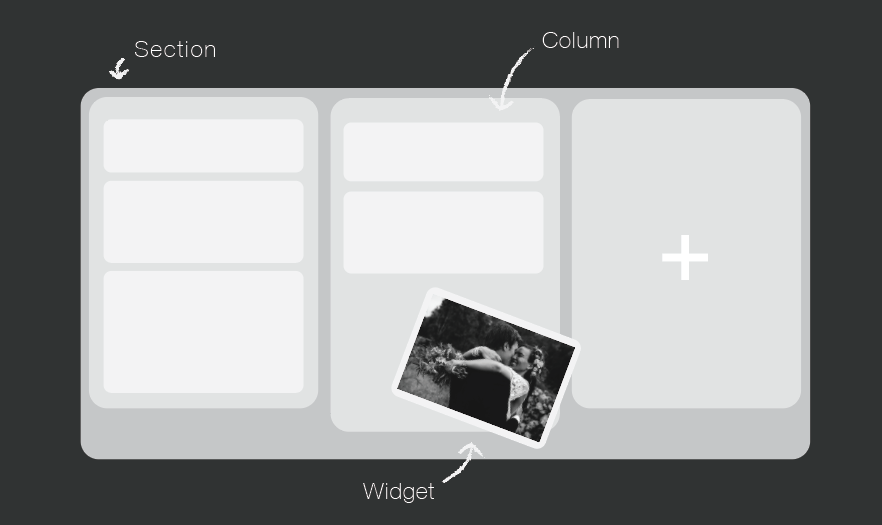
Your website is a tool to get your name out there, increase bookings, keep your clients updated, and share your work. You can do all that very easily in Workspace. Over the next few weeks, we will be focussing on creating a Workspace website you can be proud of, which is completely unique to you and your business. The Page Designer Each page is built up of horizontal sections, which you can divide up into columns. Within those columns, you add "widgets" to build components like hero images, text, contact forms and slide shows into your site. Workspace has a wide range of To View More >>
This entry was posted in Product Updates by Alexandria Baugh

Modern cameras have sensors capable of producing big, beautiful images. They output files that can make large wall portraits without effort. But what happens when you want the image to be smaller, as in an album? What happens when you downsize a file that's big enough to print a large wall portrait, to create a 3x2" image on a page layout? When you export your images from Photojunction for printing, the software runs an automatic Photoshop process that resizes them and places them into a PSD file. The images are enlarged or reduced, and positioned to suit how you want them to appear on the To View More >>
This entry was posted in by Queensberry Website


