
Blog

Recent posts
Photojunction's new feature is a timesaver. It auto creates an album from a selected template collection, and populates the apertures with images from a selected image Group or Collection. Before we move on, a disclaimer... Auto Flow is a simple feature. There's no clever algorithm built in to choose and place images in a deliberately coherent order. We're leaving some of the creative stuff up to you ;) You'll find the Auto Flow option by clicking the 'More' button in the Event Window. Just click the 'Create album from templates' option and you're away. 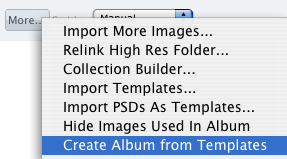 Photojunction will ask you to choose a Template collection (all templates must be either single or double sided), and the Group or Collection you'd like it to pull the images from.
  Then voila! Photojunction will do all the grunt work and leave you to tell the story. Cheers, Danny
Photojunction will ask you to choose a Template collection (all templates must be either single or double sided), and the Group or Collection you'd like it to pull the images from. Then voila! Photojunction will do all the grunt work and leave you to tell the story. Cheers, Danny

