
Workspace is designed to help you organise your relationships and your work in a way that reflects how your business actually runs. Each part plays a different role, but they all connect.
How It All Connects
Here's a simple way to understand how everything fits together.
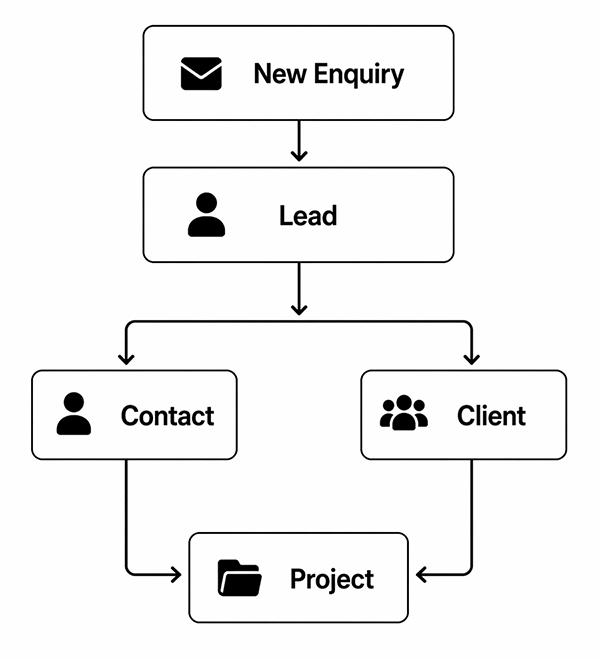
What this means:
The key Idea
Projects = the work
Clients & Contacts = the people
Start simple:
- Every enquiry starts as a Lead.
- Qualified Leads become a contact and a client.
- Use Contacts + Projects for most jobs.
- Projects are where you manage the work.
- Contacts are the people it's being done for.
- A Project can have more than one Contact.
- You can create a Client later when/if the relationship becomes ongoing.
- You can link existing Contacts, Projects, Galleries etc. to a new Client.
Leads
When someone fills out a form, sends a message, or otherwise reaches out to you, they begin as a Lead. Leads help you capture opportunities and manage enquiries without losing track of them.
They are the earliest stage of your workflow, before anything is confirmed. Leads can then be qualified, responded to, and (if they check out) converted into Contacts, Clients, and Projects as things progress.
Examples:
• A wedding enquiry for next summer
• Someone asking about portrait pricing
• A business reaching out for a brand shoot
Clients
Clients are the people or businesses you work with, and your Client records are where you'll find everything to do with them in one central location. They're important when you expect a relationship to be ongoing, or a job will involve more than one shoot or Project, or you're dealing with multiple Contacts in an organisation.
Important: Clients are optional. For one-off jobs, you can simply create a Project, assign a Contact to it and link it to a Client when and if it becomes necessary.
Client examples:
- A family you photograph every year
- A couple whose wedding you're capturing, but hope to do additional shoots for, e.g. engagement, rehearsal dinner, family portrait
- A school or organisation you work with regularly
The Client Dashboard
The Client name, description and any internal notes are all new data, but the following are simply links:
- Contacts
- Projects
- Galleries
- Albums
- Tasks
- Assets and links (to external resources)
- Messages
Client Portal
You can also enable a dedicated Client Portal, where the client can access everything related to their work from one screen, including:
- Projects
- Galleries
- Albums
- Contracts
- Invoices
- And more
The Client Portal can be kept private (not shared with the Client). If so, clients can still access galleries and albums via their own sharing functions, just not all from on the central screen.
Contacts
Contacts are individual people within your network. They can be connected to a Client, although for one-time assignments a Contact and a linked Project will often be enough. The purpose of Contacts is to help you keep track of people and how they're connected to your business, e.g. through Clients, Projects or Tasks. This doesn't just include your customers and their people: your suppliers, tradespeople, couriers, accountant and other professional advisors can all be Contacts. The opt-in email lists you build up can also be used for marketing.
Contacts can store:
- Names and companies
- Email addresses and other contact details
- Communication history (e.g. mailing list status)
What can be linked to a Contact
- Projects
- Tasks
- Bookings
- Assets
- Messages
- And more
Projects
Projects are the work you undertake, and designed to keep your work organised from start to finish. They can be linked to a Client, or to a Contact for one-off work. A Project is typically created for each specific job, shoot, or piece of work. It holds everything related to that job, including:
- Tasks
- Timelines/ Schedule
- Galleries
- Deliverables
- Contracts
- Invoices
- Communications
Project examples:
- A wedding day
- A family photo session
- A commercial campaign
- A school photo day
Notes and Messages
Messages
Messages are email and Live Chat conversations with Contacts and Clients. SMS interactions are not yet enabled.
Messages are assumed to relate to the whole Contact/Client relationship, so can all be accessed from any of the Contact, Client and Project screens.
Internal Notes
Internal Notes are private (i.e. not intended to be shared outside your organisation), and will relate to (e.g.) a specific Project or Contact within an organisation. That means the Notes on a Contact, Client or Project screen will all be different.
Examples of Internal Notes
- All orders are to be shipped on the XXXX Courier (on the Client screen)
- Joe handles all product queries (on the client screen)
- Joe only works afternoons (on the Contact screen)
- Order must go by Friday 21st (on the Project screen)
- Be sure to include photos of grandparents in the album (on the Project screen)


